


Xcel Energy
4.3415.00 Reviews
App Specs
- Version
- 1.9.1
- Updated On
- License
- Free
- Downloads
- 100,000+
- Developer
- Xcel Energy Inc
- Categories
- Business
- Platform
- Android, iOS
Screenshots
 Analysis by AppCompare
Managing an energy account is rarely something I want to turn into a long administrative task. Most of the time, I need a quick answer: whether a payment went through, what my account looks like, or where to start when something about my service needs attention. Xcel Energy is built for that kind of customer routine, bringing account management into a mobile app rather than making me depend entirely on a browser.
After spending time with it, I see the app as a practical companion for existing Xcel Energy customers rather than a general energy-saving tool. Its strongest quality is focus. It keeps the experience centered on the account itself, which makes common tasks easier to reach when I already know what I need. The trade-off is that its usefulness depends heavily on having Xcel Energy service and on wanting a direct account-management experience instead of a broader household-finance or home-automation platform.
How the everyday account workflow feels
The basic workflow is straightforward: open the app, identify the account area that matters, complete the task, and leave. That sounds simple, but it is exactly what I want from a utility app. I do not want to browse through unrelated content before checking something important. The app’s purpose is clear from the beginning, and the store summary describes it accurately as a way to manage an Xcel Energy account.
A realistic example is checking the account before leaving for work. If I remember that a payment or account task needs attention, I can use the phone instead of waiting until I am at a computer. The value is not dramatic every day; it is the reduced friction when the task appears at an inconvenient moment. That makes this more useful as a repeatable habit than as an app I open casually.
I would recommend setting up a consistent routine around it. For example, I might check the account after receiving a bill notification, review the current status before a busy week, and use the app whenever I need to handle the account away from home. This avoids opening it randomly and wondering what to do. The best way to use this app is as a small account checkpoint, not as an app to explore for entertainment.
The experience also makes sense for people who prefer keeping household administration on a phone. A shared household can use the app as a convenient reference point when one person normally handles utility matters. It is also useful for customers who dislike saving utility tasks for a monthly desktop session. I would still keep important account information accessible through another trusted method, especially if the phone is unavailable or the app needs maintenance.
Xcel Energy, the developer, has positioned this as a business app for its own customer relationship rather than a universal energy dashboard. That distinction matters. If you are already an Xcel Energy customer, the direct connection is the reason to install it. If you are comparing providers, monitoring several properties, or trying to combine multiple utility accounts, the app is not designed to replace those broader tools.
Worth Reading Before You Choose

EA SPORTS FC Mobile 26 Is a Bigger Football Game, but It Takes Time

Flipboard Shows What News Apps Must Do Beyond the Feed

Switching to Android Auto Means Rethinking Your Driving Routine

Google Calendar Makes a Crowded Week Easier to Manage

Ludo King Makes the Most of the Minutes Between Plans

Baby Panda World Brings Quick Play to Modern Phones, but Its Game Library Feels Busy
What I would check before relying on it
The app is free, which removes the main barrier to trying it. It is also rated for Everyone, so its presentation is intended for a broad audience rather than a specialist group. The current version is 1.9.1, and the app supports devices running Android 8.1 or later. That compatibility is helpful for people who keep a phone for several years, although I would still make sure the operating system and app are updated before judging performance.
The app has an average rating of 4.3 from around 3.4 thousand ratings, with more than 400 written reviews. I read that as a positive sign of general usefulness, but not as a guarantee that every account or device will behave identically. Utility apps can feel excellent when the account is already in order and frustrating when a customer is dealing with a service-specific problem. The app has passed the threshold of over 100 thousand installs, so it is not an obscure experiment, but its audience remains naturally limited to Xcel Energy customers.
One practical question is whether it is worth installing if I only interact with my utility once in a while. My answer is yes if I prefer mobile access or want a faster way to handle account checks. If I already use a computer comfortably and rarely need the account, the app may not add much. In that case, the browser route can remain perfectly adequate, and installing another app may not justify the space or notifications.
Settings and habits that make the app less annoying
My first recommendation is to review notification behavior rather than accepting every prompt automatically. A utility app can be useful when it alerts me to something I actually need to act on, but unnecessary alerts can make me ignore the important ones. I would keep the app’s essential account-related notifications available and remove anything that does not fit my routine. The exact options can depend on the device and account experience, so I would make the decision from the phone’s notification controls and the app’s available settings.
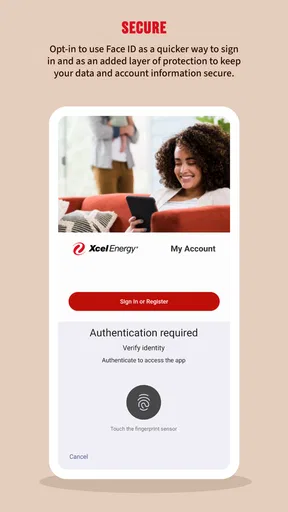
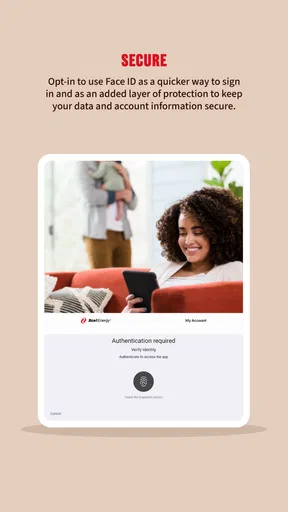
I would also check how the app handles sign-in on my particular phone. Convenience matters, but I would not trade away account security for a faster opening screen. If the device offers a reliable screen lock or biometric protection, I would use that at the device level and avoid sharing an unlocked phone. A utility account can contain information that I would rather not expose casually, even when the app itself is simple.
Another useful habit is to keep contact and account details current. When an app is used mainly for a single service provider, small mismatches in account information can create disproportionate frustration. Before blaming the mobile experience, I would confirm that I am using the correct account credentials and that the account itself is active and correctly associated. This is not a glamorous tip, but it prevents a lot of wasted troubleshooting.
I would not treat the settings as a place to search for features that the app does not promise. The app’s strength is direct account management, not a large collection of customization panels. Experienced users get more from it by choosing sensible notification behavior, protecting access, and keeping a regular check-in pattern than by constantly changing preferences.
Faster patterns for repeat tasks
The fastest pattern is to decide in advance what each visit is for. If I open the app to check an account status, I complete that check first instead of wandering through every available area. If I need to handle a payment-related task, I focus on that task and leave once I have confirmed the result. This sounds obvious, but it prevents the app from becoming another place where I spend time without finishing the original job.
I also prefer using the app at a predictable point in my household routine. A short check after reviewing other monthly expenses is more reliable than trying to remember it later. The app works best when it becomes part of a repeatable sequence: review the household budget, open the energy account, handle anything outstanding, and record or remember the result. That process is more dependable than relying on occasional curiosity.
For people managing more than one household responsibility, I would be careful about assuming that one quick glance tells the whole story. A mobile account screen is useful for immediate action, but I would take a moment to verify that I am looking at the intended account before completing an important task. This is especially worthwhile when several people share responsibility or when the same phone is used for multiple household services.
There is also a useful trade-off between the app and the usual browser alternative. A browser can be better when I need a larger screen, want to compare several pages at once, or am already doing detailed household administration. The app is better when I need a focused account interaction while away from a desk. I would not force one option to replace the other. My preferred setup is mobile for quick checks and the browser for anything that benefits from more space or a longer session.
Compared with general budgeting apps, Xcel Energy has a narrower but more relevant role for its customers. A budgeting app may help me compare energy spending with groceries, rent, and other categories, while this app is closer to the source account. Compared with smart-home energy tools, it is also a different kind of product. Those tools may focus on devices or household behavior; this app is for dealing with the utility relationship itself. Choosing between them depends on whether my immediate need is account administration or broader energy analysis.
Where the app reaches its limits
The biggest limitation is its provider-specific nature. I would skip it if I do not receive service from Xcel Energy, because the app’s central purpose does not translate into much value for someone outside that customer base. I would also look elsewhere if I need one dashboard for several energy providers, rental properties, or a full household financial picture.
I would not expect it to replace every possible customer-support route. A mobile app can make account tasks more convenient, but it cannot remove the need for patience when a problem involves service records, account verification, or a situation that requires direct assistance. If an issue is urgent or the account details do not match what I expect, I would use the appropriate Xcel Energy support channel rather than repeatedly refreshing the app.
Another limitation is that convenience depends on the phone environment. A weak connection, an outdated operating system, a crowded device, or an interrupted sign-in can make a simple task feel more difficult than it should. The minimum Android requirement of 8.1 keeps the entry point reasonably accessible, but older hardware can still provide a less comfortable experience than a newer phone or desktop browser.
I would also avoid installing it solely because a utility app seems like it might offer energy advice. That is not the main reason I find this product useful. Its practical value comes from account access and routine management. Someone looking for detailed consumption analysis, appliance-level monitoring, or a complete energy coaching system should choose a tool specifically built around those needs instead of expecting this app to cover them.
Privacy and security are worth treating seriously even with a free app. I would install it only from the official app marketplace, keep the phone protected, and avoid signing in on a shared or public device. I would also be cautious with unexpected messages that ask for account credentials. The app can simplify access, but it does not make ordinary account-safety habits unnecessary.
Who gets the most value from it
This is a good fit for an Xcel Energy customer who wants a direct mobile route to routine account tasks. It suits people who manage bills while commuting, households where one person needs occasional access, and anyone who prefers a short phone workflow over opening a desktop browser. The free price makes experimenting easy, and the Everyone rating makes it approachable for a wide range of users.
I think it is particularly useful for people who tend to postpone administrative tasks. Having the account available on the phone lowers the effort required to check something at the moment it comes to mind. That does not guarantee perfect organization, but it removes one common excuse: needing to wait until a computer is nearby.
I would be more cautious about recommending it to power users who want extensive reporting, cross-provider comparisons, or deep household analytics. The app’s focused design is an advantage for basic account management, but that same focus means it is not the best central tool for a complex energy-monitoring setup. In that situation, I would pair it with a separate budgeting or energy-analysis solution rather than asking it to do everything.
My final view after building a routine around it
Xcel Energy succeeds because it keeps a specific job in view: giving Xcel Energy customers a mobile way to manage their account. I like it most when I use it deliberately, with notifications under control and a simple routine for checking and completing tasks. It is not trying to be a universal finance app or a smart-home command center, and I see that narrow purpose as a strength rather than a weakness.
My recommendation is clear for existing Xcel Energy customers who want convenient phone access and do not need advanced multi-provider analysis. Install it, protect access to the account, adjust notifications to match your habits, and use it for quick, repeatable checks. Keep the browser or another support route available for longer sessions and unusual problems.
For everyone else, the decision is easier: if your needs extend beyond one Xcel Energy account, choose a broader tool and use this app only if that provider relationship makes it relevant. For the right customer, though, it turns a small but recurring household responsibility into a more manageable part of the day.
Pros
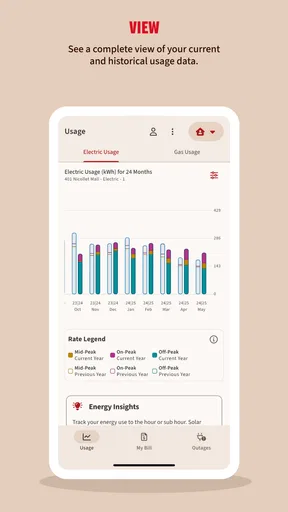
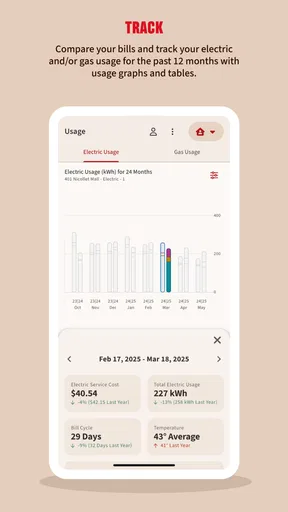
- Quickly view current and past energy usage.
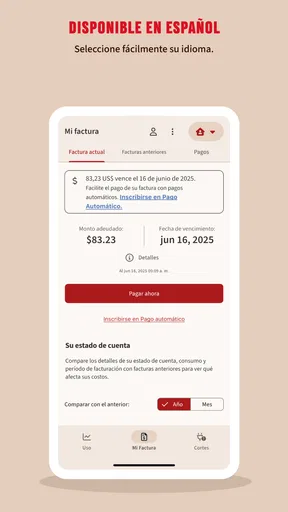
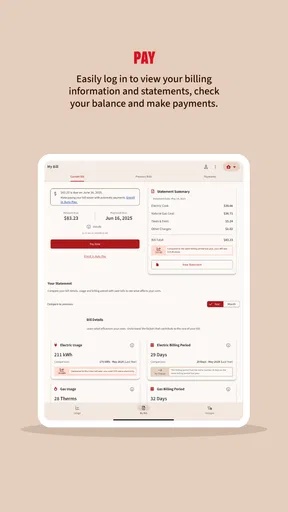
- Mobile bill payments are convenient and easy to complete.
- Outage alerts provide useful updates during service interruptions.
- Paperless billing helps reduce clutter and missed statements.
- Supports account management for multiple properties.
Cons
- Some features may require a registered Xcel Energy account.
- Usage data may not update instantly in the app.
- Outage information can lag during widespread emergencies.
- Payment processing fees may apply to certain payment methods.
- Performance and availability can vary by service region.
FAQs for Xcel Energy
What is the Xcel Energy app used for?
The Xcel Energy app is designed to help customers manage their electricity or natural gas accounts from a mobile device. After signing in, you can review your balance, pay a bill, view usage information, manage payment methods, check account details, and receive service-related notifications. Available features may vary depending on your location, account type, and the Xcel Energy services offered in your area.
Can I pay my Xcel Energy bill through the app?
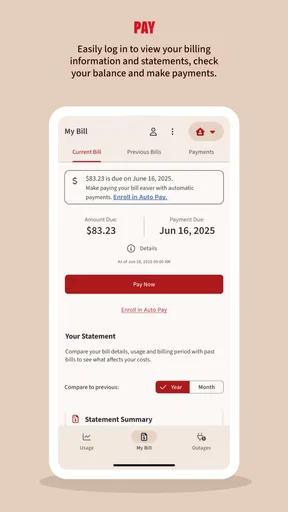
Yes, eligible customers can generally use the Xcel Energy app to make one-time payments or manage recurring payment options. You may be able to pay with a bank account or an accepted card, depending on the options provided in your region. Before confirming a payment, carefully review the amount, payment date, and selected account to avoid delays or accidental payments.
Does the Xcel Energy app show power outages and restoration updates?
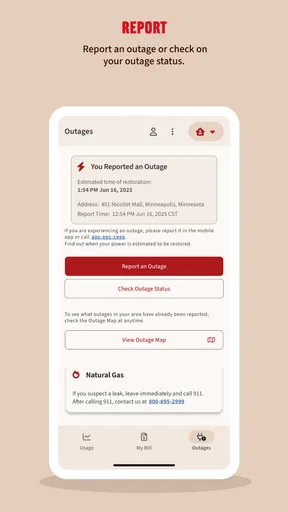
The app can provide outage-related information for supported Xcel Energy service areas, including reports about known interruptions, estimated restoration details, and service alerts. You may need to enter or confirm your service address for accurate results. Outage information can change quickly, so the app should be considered a convenient update tool rather than a guarantee of exact restoration times.
Is the Xcel Energy app free to download and use?
The Xcel Energy app is generally free to download from the official Android or iOS app store. Standard mobile data charges may still apply if you use the app over a cellular connection. Although there is normally no separate app subscription fee, charges, rate plans, late fees, or other costs connected to your energy account remain governed by your Xcel Energy service agreement.
What should I do if I cannot sign in to the Xcel Energy app?
If you cannot access your account, first check that your email address or username and password are entered correctly and that your internet connection is working. Use the available password-reset option if necessary, and make sure the app is updated to the latest version. If problems continue, contact Xcel Energy through its official support channels and avoid sharing your password with anyone.


